 Kajabi
Hi, I’m Hoda, a Kajabi partner. In this article, I’ll introduce Kajabi.
You may have heard the name, but wonder, “Just how good is Kajabi, really?”
In fact, Kajabi is one of the top online course platforms in the world, highly regarded by creators and online business owners everywhere.
Recently, it drew attention when the cumulative sales processed by creators using Kajabi surpassed $1 billion.
This is not just a count of “registered users.” It is the scale of sales generated by creators who actually use Kajabi to sell online courses, communities, coaching, digital products, and more.
Today, businesses around the world, including the US, the UK, Canada, Australia, and countries across Europe, use Kajabi, and hundreds of thousands of payments are processed every week.
In other words, Kajabi has evolved from simply “a tool for creating online courses” into a business foundation for growing sales.

Many creators and companies are already building their businesses around Kajabi, running:
- Online schools
- Coaching businesses
- Community operations
- Subscription-based content sales
- Digital product sales
I have worked with Kajabi myself for many years, and it is quite rare to find a service that integrates “sales, marketing, membership management, email delivery, and community” this thoroughly.
In this review, I’ll cover Kajabi in detail from an expert’s perspective, including its pros and cons, drawing on the actual dashboard and my operating experience.
Dashboard

A big feature of Kajabi’s dashboard is that you can manage online course sales, email delivery, community operations, landing page creation, and more from a single dashboard. The UI design is highly polished, and it becomes intuitive to use once you get used to it.
Recently, the dashboard has been updated frequently and has become even easier to use than before. I have used Kajabi for many years myself, and I feel that “it has many features but you don’t easily get lost” is a big advantage even compared with other tools.
On the other hand, some people are initially thrown by the English-based dashboard. Once you get used to it, though, everything is organized so that you know where to find what, so it is a platform that is easy to run over the long term.
Video Courses (Course)

Kajabi’s course feature is among the most complete of the video course sales platforms. I’ll introduce each feature along with my impressions from using it intensively for more than five years.
Unlimited Video Uploads (Up to 4GB per File / 4K Supported)
On Kajabi, the number of videos you can upload is unlimited on all plans. Each file can be up to 4GB, so even long HD videos of 30 to 60 minutes or more upload without problems. 4K quality is supported, and you can attach subtitle files in .srt format.
You don’t need to upload separately to Vimeo or YouTube and embed, so management stays simple, which is a big advantage.
Teachable and Thinkific also advertised unlimited uploads, but they currently have limits, “Teachable = up to 1TB” and “Thinkific = bandwidth limits,” so it isn’t completely unlimited uploading.
Unlimited Lessons
There is also no cap on the number of modules and lessons in a course. Even a large course with 100 modules and 1,000 lessons in total can be built without problems.


The types of content you can use in lessons are:
- Video
- Audio
- Text
- Quiz
- Downloadable materials
- Live (Zoom integration)
PDFs are provided as downloadable materials (embedded display like Thinkific’s is not supported).
Bulk upload is also supported: when you upload multiple video files at once, they are automatically converted into lessons. It is a handy feature when migrating from another service.
Quiz Feature
You can add an unlimited number of quizzes in each course. There are four question formats: multiple choice, multiple select (checkboxes), free-text, and file upload, and you can attach images to questions.
If you set a passing score and combine it with the lock feature, you can build a mechanism such as “students can’t move on to the next module unless they score at least X points.” Free-text and file upload questions require manual grading by an administrator, but you can leave feedback comments after grading, which allows an educational design.
You can also change the email content sent depending on pass or fail, or connect to automations. A series of automations like “quiz pass → issue certificate → add tag → send email for the next step” is something Kajabi is particularly strong at.
-
Four question formats
-
You can choose whether to grade or not
-
You can set a passing score and automate moving on once students pass
-
You can attach images to questions
-
You can't run a full-fledged test like an exam
-
Quizzes can be retaken any number of times
Customize the Course Page Design
The course top page that students actually see can be customized by choosing a template. You can adjust it quite freely, such as changing colors and background images, localizing button text into your own language, and adding an instructor profile.
You can also set a course “completion message,” and use it to guide students to another product or send them to a review form after they finish.

If you want serious customization, this page is written in Liquid code, so you can also customize it heavily with coding.
Free Preview of Just Part of the Course
By using the “Paywall” feature, you can make only the first part of a course public for free, and show the rest only to those who purchase. For example, you can complete a marketing path inside Kajabi: collect email addresses for free, educate people with a sequence of emails, and guide them to the full paid course.

Detailed Reports by Video and by Student
Kajabi lets you see the data inside a course in fine detail.

Main items you can check in the video report:
- Average watch rate and total plays
- When the video was watched
- Where viewers dropped off

Main items you can check in the student report:
- Each student’s progress (what percentage is complete)
- Last login date and time
- Status of each module and lesson
Beyond just providing the course, you can use this to improve operations, such as sending follow-up emails to students who haven’t been watching.
Comment Feature

You can add a comment section to each lesson. It can be turned on or off per lesson, and there is a comment approval feature. You can use it to take questions and feedback from students. Managing comments can sometimes be a burden, and in those cases you can turn it off to keep things from getting out of hand.

Notification emails can also be customized, and you can freely change the email subject and body used when a comment arrives.
Setting an Access Period
Even for a one-time purchase course, you can set an access period such as “viewable only for X days after purchase.” For example, you can sell something like a $20 course that is viewable only for 90 days from purchase.
Viewing from the App
Kajabi has a free official smartphone app (iOS and Android), and students can access the content just by downloading the app and logging in. It supports both courses and communities, and push notifications are available.
With a higher plan or an add-on ($199 per month), you can also publish your own branded app to the App Store and Google Play. This Branded App lets you freely customize the logo, colors, and layout, and Kajabi handles app updates and review submissions.
I explain the Branded App in detail later.
Because It Uses Wistia, Videos Are Hard to Download
Kajabi uses a video hosting service called Wistia on the backend, rather than YouTube or Vimeo. Wistia is designed with a focus on preventing downloads, so it creates an environment where students can’t easily download video content without permission.
When selling paid content, content protection is a very important point. On this point, it is a big advantage compared with general video services such as Vimeo’s free plan.

Also, videos are delivered by streaming, so the videos you upload are delivered in an optimal format. As with YouTube, they are delivered at the best quality for each viewer’s internet connection.
Easy to Organize with a Category Structure
In Kajabi, you can organize a course with this structure:
- Module (chapter)
- Submodule (sub-chapter)
- Post (lesson)

For example:
-
Chapter 1: Basics
- Lesson 1
- Lesson 2
-
Chapter 2: Advanced
You can organize it quite flexibly like this.
It stays easy to manage even as the number of videos grows, and it suits large courses.
With Thinkific and other tools, there are often only two levels, “chapters” and “lessons,” but Kajabi has something like sub-chapters, so even as lessons increase within one course, it is easy to keep organized.
Drip Delivery and Lock Features

Kajabi also has rich learning management features.
- Drip delivery: Release the next lesson a set number of days after enrollment
- Lock feature: Students can’t move on unless they complete a specific lesson (prerequisites)
- Scheduling: You can also schedule a release for a specific date
and more.
This lets you build a step-by-step learning path rather than “everyone binge-watches and it’s over.” For schools that manage students in seasonal cohorts, you can also release the chapters in a course to everyone at the same time.
(New Feature) Timestamps Added
Long-awaited timestamps were added in 2026, so even for long videos, you can now add chapters by time, as on YouTube.
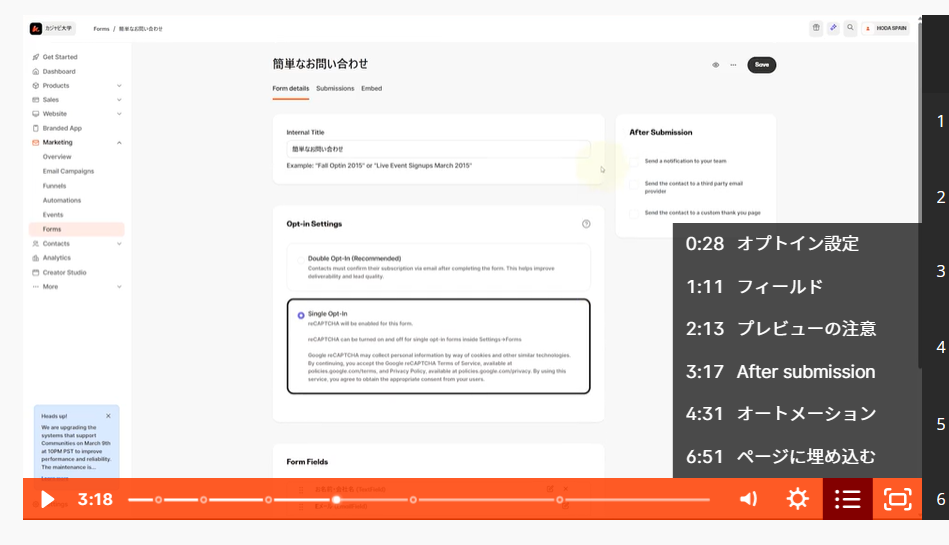
Quizzes and Assessments
Kajabi used to be said to be weak on quizzes, but it has improved considerably.
- Automatic grading of multiple choice
- Passing score settings
- File submission
- Free-text answers
- Completion conditions
and more are supported.
You can also trigger automations from quiz results.
For example:
- Send a completion email to those who pass
- Add a tag
- Introduce a higher-level course
- Issue a certificate
You can run it in quite a practical way.
Strong Integration with Community
A major feature of Kajabi is that video courses and the community feature are integrated.
For example:
- A community for course participants only
- Comment interaction
- Announcements
- Event information
You can complete all of these inside Kajabi.
Not having to depend on an external Facebook group or Discord is a big advantage.
Polished Design
Kajabi’s course player UI is also very clean.
True to its overseas-service roots, it is solidly:
- Minimal
- Modern
- Mobile-optimized
The viewing experience on smartphones is especially good, which affects student satisfaction.
Relatively Generous Video Capacity Limits
Kajabi’s video upload limits are quite generous compared with other services.
Currently:
- No strict limit on the number of videos
- Up to 4GB per file
Even courses that handle many high-quality videos are easy to run.
Offer
One of the most characteristic concepts in using Kajabi is this Offer.
In Kajabi, you can’t put a price directly on a “Product” such as a course or community. Instead, you create a “price package” called an Offer, and sell by including the product in it.

The image to keep in mind is that the Offer is the “box,” and the Product is the “contents.” By buying an Offer, the buyer gets access to the products inside it.
This mechanism makes flexible selling like the following possible. (The Offer is hard to explain in text, so I’d recommend watching the video.)
- Sell one course on its own
- Sell multiple courses together as a set
- Combine a course and a community into one Offer
- Prepare multiple Offers for the same product, such as a regular price, a special price, and a corporate price
You can create an unlimited number of Offers on all plans, so you can design your sales patterns freely.

Checkout Page
When you create an Offer, a payment page (checkout page) is generated automatically at the same time. Just share this link on social media and you can start selling right away.
With the 2025 to 2026 updates, the checkout page can now be customized as freely as a regular landing page. You can build not only a simple payment form but also a landing-page-style page with persuasive content.
You can also flexibly set the customer information collected at checkout. In addition to name and email address, you can freely add custom fields such as:
- Text input (company name, social media account, and so on)
- Dropdown selection
- Radio buttons
- Checkboxes
You can also embed a terms of service agreement checkbox in the checkout screen, which helps prevent post-purchase trouble. It is especially handy when selling coaching, high-priced courses, or services for businesses.

Four Price Types
You can set the following four price types in an Offer.
- Free - A format in which people “purchase” for $0. You can use it to hand out free gifts and trial content.
- One Time - A one-time purchase. You can also set a viewing period after purchase (for example, 90 days from purchase).
- Payment Plan - Installments with a set amount and number of payments. For example, you can set something like “$400 × 6 payments,” which is effective for lowering the purchase barrier on high-priced courses. It used to be that students could cancel partway through, but this has been improved so that the full amount is collected.
- Subscription - Recurring billing such as monthly or yearly. You can also set a free trial period and a setup fee, which makes it ideal for membership-type businesses.
You can also display multiple pricing plans side by side within a single Offer, so that buyers can choose a plan themselves (for example, choosing between a one-time payment, installments, and an annual plan on the same page).

Limited-Quantity and Limited-Time Sales
You can set limits on the quantity or period of an Offer.
- Limited quantity: Set a cap on the number of units sold, and purchasing automatically becomes unavailable once the cap is reached. You can use it for selling event seats or for first-come-first-served campaigns for the first X people.
- Limited time: Set an end date and time, and purchasing automatically becomes unavailable at the specified time. It is ideal for limited-time sales and enrollment-based courses with a deadline.
Order Bump
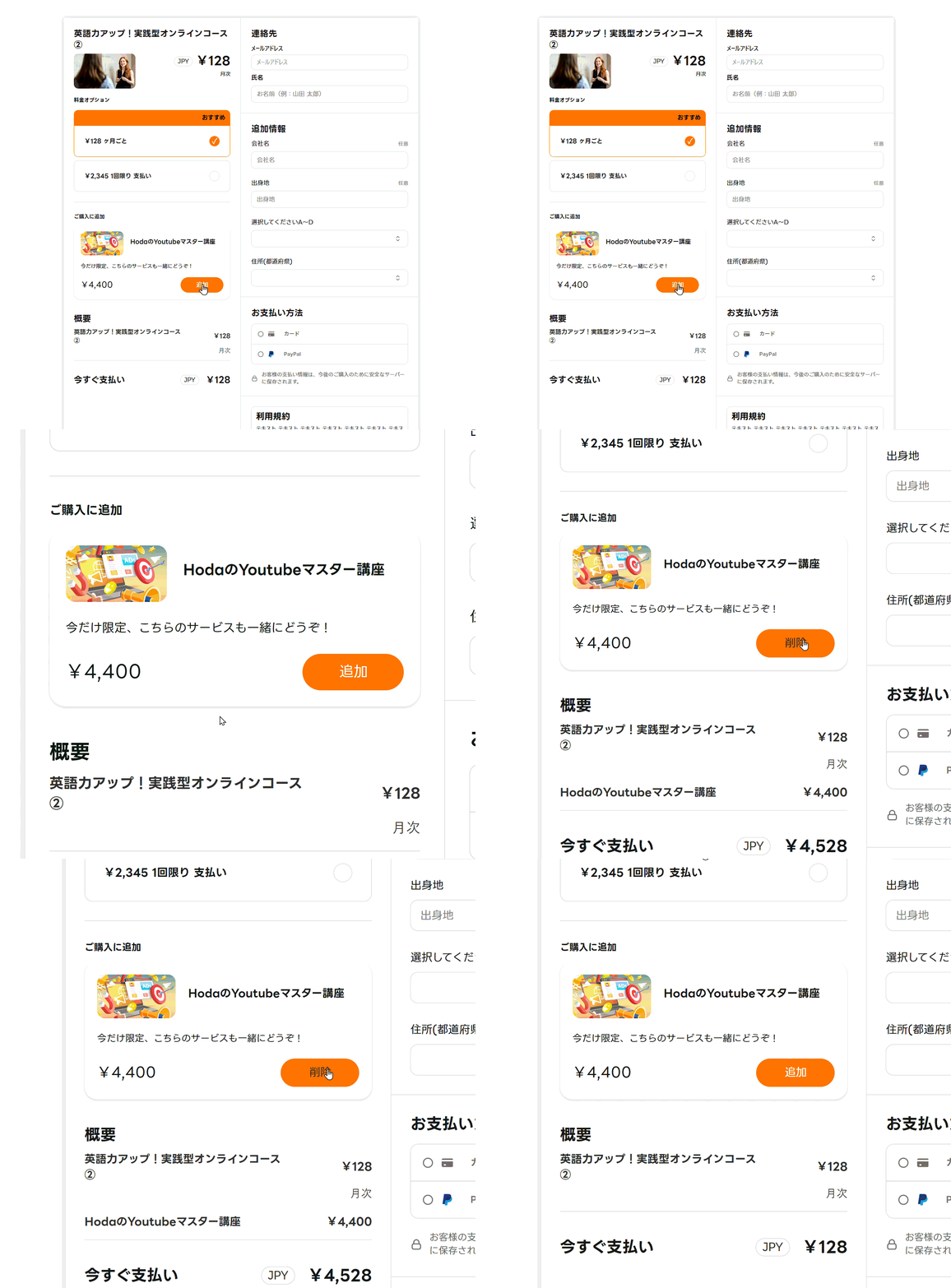
An Order Bump shows an “additional product” on the Offer’s checkout page, which buyers can purchase together by ticking a checkbox. Unlike an upsell, buyers can decide on the spot without moving to another page, so you can make a suggestion without interrupting the purchase flow.

It can be set for both one-time payments and subscriptions. For example, when someone buys an “$80 video course,” you can show a checkbox saying, “Would you also like community access for $22 per month?”
Examples of use
- Video course + individual support (monthly)
- Study materials + template collection
- Course + community access
- Course + one-on-one lessons
With the 2026 update, you can now set multiple Order Bumps for a single Offer (released early as a beta). This also makes it possible to design it so that buyers can choose which products to add to their cart from several options.
Upsells and Downsells

There are also upsell and downsell features that recommend another Offer right after an Offer is purchased.
- Upsell: Proposes a higher-priced product right after purchase.
- Downsell: Proposes a more affordable product to people who declined the upsell.
You can set up to 10 upsells and downsells in total for one main Offer, so you can build a multi-step sales flow.
Upsell pages can now be customized as freely as regular landing pages, so you can design highly persuasive pages. Because buyers can pay with one click, they also don’t have to re-enter their card information.
Coupons
Issuing discount coupons is also supported. You can set either a percentage discount or a fixed-amount discount, and specify the target Offer, expiration date, number of uses, and more in detail.
When applying a coupon to a subscription, you can also set conditions such as “a discount for the first 3 months only” or “a discount for the whole period.”
In addition to having people type the coupon code by hand, you can also issue a URL with the coupon already applied and share it. This prevents trouble such as students forgetting to enter the code.

A Handy Way to Use Offers

In Kajabi, you normally link “Products (courses, communities, and so on)” to an Offer and sell it. But you can also create an Offer for payment only, with no Products included at all. This is a usage called a ghost offer.
With a ghost offer, you don’t deliver any content on Kajabi, and simply accept payments. It is handy for things like event fees, monthly tuition, consulting fees, billing a price difference, monthly support, and selling physical goods.
Even for services unrelated to the Products in Kajabi, you can use the regular checkout feature, coupons, and payment management as is, so you can create a sales path flexibly.
With other tools, you always have to sell a course or community, but with Kajabi you can effectively accept payments for things like the following too:
- When you just want people to pay, such as monthly tuition or event fees
- When you want to sell a service unrelated to Kajabi’s Products
- When you want to accept a payment for a price difference
- When you take on services such as monthly support or consulting
- When you want to sell things like event access
- When you sell physical goods
Community

Kajabi’s community feature is a product specialized for running online salons and membership communities. Its design is like a mix of a Facebook group, Discord, and Slack, giving you a place where members can interact in a social media style.
Since it acquired the community platform “Vibely” in 2024, updates have continued with particular focus, and it now functions as a full-fledged community management tool that goes beyond a simple message board.
What You Can Do

In the community, you can do things like the following.
- Posts, comments, and reactions (emoji such as likes can be customized)
- Direct messages between members
- Gamification (earn points through posts and comments, awarding titles and badges)
- Managing membership levels with access groups
- Access from the smartphone app (iOS / Android)
- Setting a community-only nickname (supported from 2026)
The addition of the nickname feature is an especially big update for people who don’t want to use their real names. Previously, the real name entered at course registration was displayed as is in the community, but now you can set a community-only name, so members who don’t want to show their real name can join with confidence.
Access Group

This feature lets you divide membership levels and ranks within the community and limit what each can see. You can create multiple access groups in one community, and finely control which channels each group can view.
For example, you can design it as follows:
- Free members → can only view the announcements channel
- Standard members → can view general discussion channels + announcements
- VIP members → can access all channels
With the 2026 update, access groups are no longer counted toward your product count. You can create effectively unlimited groups, which allows flexible operations such as groups by year or staff-only groups.
Channels
Channels are the “rooms” of the community, and you can create an unlimited number of them. Depending on the use, you can choose from these formats.
- Feed type: A style like Facebook posts, where members freely post and comment on each other
- Group chat type: A chat format for real-time exchange, like a group chat in a messaging app
Posts support images, video, audio, GIFs, embedded code, and more, and text formatting (bold, headings, strikethrough, emoji, and so on) is also possible. A polling feature is available too, so you can use it for surveys and gathering opinions.
If you set up a private channel, you can design something like a hidden room that only specific members can access. In a recent update, you can also create an announcements-only channel that only administrators can post to.

Meetup

This is an event and video conferencing feature built into the community. Without a tool like Zoom, you can hold a video meeting inside Kajabi for up to 200 people with no time limit.
The controls are almost the same as Zoom, and it supports turning the camera on and off, screen sharing, background blur, text chat, sending reactions, and more. Administrators can also record meetings, and many operators upload the recordings into a course as an archive.
You can use it not only for webinars and online study sessions, but also to announce events such as meetups. One-click adding to Apple Calendar and Google Calendar is supported too, so letting members know goes smoothly.
Challenges

This is a feature for running an event in which all members work on the same task along a theme for a set period. Members share posts and progress as they go, which helps energize the community. You can also give rewards to outstanding members.
Examples of use:
- An event where members post daily study logs and progress reports
- A 30-day training challenge
A Note on Language Support
Compared with the course features, the community still has some English text left in places. For example, the challenge guidance and some UI text remain in English. If many of your students are uncomfortable with English, you need to consider this in advance.
However, a request has already been submitted on Kajabi’s feedback site (feedback.kajabi.com), and the text in the community is expected to become finely customizable in the future.
Coaching

Kajabi’s coaching feature is a product for offering one-on-one coaching and group coaching. Rather than “showing recorded content” like a video course, it suits a business model where you want to decide the number of sessions and support people directly.
What You Can Do
With a coaching product, you design the curriculum (number of sessions and content) in advance, and can complete online sessions with students entirely within Kajabi. You don’t need to set up Zoom or a calendar tool separately.
The main features are as follows.
- Calendar booking: Students can choose an open date and time and book a session. The administrator sets the available time slots in advance.
- Video conferencing: You can hold online sessions one-on-one or in groups using Kajabi’s built-in video conferencing tool. There is no time limit.
- Progress management: You can see, for each student, which sessions are complete and when the next session is.
- Notes: The coach and the student can each leave notes for each session. Using them as shared notes makes it smoother to review a session and hand off to the next one.
- Reminder emails: You can also send emails automatically before and after sessions.
The Student Experience
When a student accesses a coaching product, a list of all sessions is displayed. The design lets them see at a glance which sessions are complete, which are coming up soon, and which are not yet scheduled, and the whole UI was refreshed and made easier to read in the 2025 to 2026 updates.
When they click the session they want to book, a calendar appears, and they just choose the date and time they want and confirm to complete the booking. On the day of the session, they can enter Kajabi’s video conferencing tool directly. If you upload the recording after the session, students can also watch it later as an archive.
How to Sell It
Coaching is also sold through an Offer. For example, you can set something like “individual coaching with 5 sessions included: $2,000,” and sell it with a one-time payment or installments (Payment Plan). You can also combine it with a course and a community into one Offer.
Podcast
With Kajabi, you can easily deliver not only video courses but also original audio content (podcasts). Demand for “learning by listening” has been growing lately, and being able to have people listen to your content while commuting, doing chores, or traveling is a big advantage.
Kajabi’s Podcast feature is not just audio uploading. It also supports distribution to Apple Podcasts, Spotify, and more, so you can run a full-fledged podcast.
-
Unlimited number of episodes
-
Supports both public and members-only (private) podcasts
-
Supports migration from other platforms
-
Can distribute automatically to Apple Podcasts, Spotify, and more
-
Can also be used for audio delivered only to course participants
-
Easy to listen to from the smartphone app
-
Less design freedom for the Podcast page itself
Kajabi’s particular strength is that you can easily create a “members-only podcast.”
For example:
- Audio delivery for paid members only
- Audio for coaching participants
- Supplementary explanations and Q&A
- Audio content to listen to while working
You can provide all of these as is within Kajabi.
Normally, creating a members-only podcast requires combining several tools, but with Kajabi it can be integrated with courses, community, and email delivery, so it is quite easy to manage.
On the other hand, compared with a platform dedicated to podcasts, the customizability of the Podcast page is somewhat limited. So it is closer to the image of using it as added value for an online school or membership site, rather than “making the podcast your main business.”

Page and Site Building
Kajabi has a powerful page builder, and you can create and publish all the pages an online business needs inside Kajabi.
You can complete a business website with Kajabi alone, without preparing WordPress or another site builder.
Some of my clients have stopped using WordPress and moved to Kajabi. You can build a modern site, and there is no need for server maintenance.
The Kajabi Japan support site is also made with Kajabi pages. (Some of it is customized with code, but the base is Kajabi.)
Pages You Can Create and Their Features
There is no limit on the number of pages you can create, and no limit on monthly views (page views). You can freely add the pages you need, such as sales pages, landing pages, a home page, a contact page, and an about page.
Connecting a custom domain is supported on all plans, and with an SEO-conscious design and a fast server environment, page loading speed is also well secured. It is of course mobile responsive, and automatically optimizes the desktop display for mobile.
Ease of Use of the Page Builder
You can create pages with a drag-and-drop visual editor. Even without specialized coding knowledge, you can build modern-looking pages just by combining blocks.
Because you can specify block widths in detail and line them up, fine layout design is possible, such as 2-, 3-, and 4-column card layouts and side-by-side image and text layouts. Duplicating blocks and changing their order is also intuitive.
More than 30 templates are available, which you can choose by use, such as for sales, podcasts, and link-in-bio pages. Just by swapping the text and images in a template, you can create a page of publishable quality right away.
A slightly older video, but it should give you a feel for page building:
Advanced Customization with Code
You can also embed CSS and JavaScript directly, on all plans. You can load Tailwind-style design to make stylish pages, and for those comfortable with code, the freedom of design increases further. You can also add animations to pages and load external scripts.
You Can Switch the Display Between Desktop and Phone

A particularly handy feature of Kajabi’s page builder is that you can control which elements are shown on desktop and on phone separately.
You aren’t just rearranging the desktop layout vertically. You can flexibly switch so that A is shown on desktop and B is shown on phone. With more than half of visits often coming from smartphones these days, this feature is very useful in practice.
DEMO site ← The top image changes between desktop and phone.
Many tools automatically support mobile responsiveness, but few let you manage showing and hiding elements on desktop and phone like this.
The Difference Between Websites and Landing Pages
Kajabi manages pages in two broad types.
Websites use a common header and footer on all pages. They suit pages where you want a consistent brand feel, such as a home page, contact page, and blog.

Landing pages let you set a unique header and footer for each page. You use them when you don’t want extra navigation, as on a sales page, or when you want to design freely from a blank state. You can also publish them as completely independent pages that don’t make people aware you are using Kajabi.

Blog Feature
Kajabi also has a built-in blog feature. It supports category settings, thumbnail images, OGP settings, and more, and you can write posts with a feel close to WordPress. It is a handy feature for people who want to complete content marketing and SEO-driven traffic inside Kajabi as well.
However, if you already run a blog on WordPress or another platform, I don’t think you need to go to the trouble of moving to Kajabi. WordPress outperforms it in some respects, such as ease of writing and customizability, so it is realistic to see this as an option for people starting fresh.
An example blog made with Kajabi
Email Delivery
One point where Kajabi clearly differentiates itself from other course platforms is this email delivery feature. Many competing services such as Thinkific don’t have email delivery, and you have to combine them with an external email tool.
Kajabi, on the other hand, comes with built-in email delivery on par with dedicated email tools, so you can complete everything from course sales to email marketing with Kajabi alone.

Basic Specifications
- Monthly sends: unlimited (no cap by plan)
- Supports creating and sending HTML emails
- You can send from your own domain (if you don’t have a custom domain, you can send from Kajabi’s domain)
- Detailed reports such as open rate and click rate are available
- You can save the email designs you create as templates and reuse them
Email Broadcast

This is what is usually called an email newsletter, where you write the content and send it each time. You can send without limit, and scheduled sending is also supported.
You can narrow the recipients in detail: not only the whole school, but also users who own a specific course, users with a specific tag, or a segment grouped by email address conditions.

A/B testing is also supported. You can prepare two versions of the subject or body, send them randomly, and compare open and click rates. The specs are more than enough for people who want to seriously improve the KPIs of their email efforts.
Main uses:
- Announcing campaigns and sales
- Announcing new product releases
- Announcements and news
- Exclusive information for participants of a specific course only
- Re-engaging existing customers
Email Sequence

You create multiple emails in advance, and they are sent automatically in order, triggered by actions such as submitting a form or purchasing a course. These are also called drip campaigns or autoresponder sequences.
The interval in days and the send time can be set individually for each email, and you can build a sequence of 100 or 200 emails. You can also set conditional branching such as stopping further emails if the user purchases the target Offer partway through.
It is practical that you can design it so that emails reach people only at the right timing, while avoiding pushy follow-up.
Main uses:
- Free signup → deliver educational content → guide to product sales
- Follow-up after a course purchase
- Building trust with story-style delivery
- Providing step-by-step educational content
By making good use of Email Sequence, you can build a mechanism that, once set up, automatically nurtures prospects and leads them to purchase.
Event Email

This feature automatically sends reminders and follow-up emails based on a specific date and time. It is often used before and after events with a set schedule, such as webinars and study sessions.
For example, if you set up a flow in advance such as “a reminder 5 days before the event,” “a second notice 3 days before,” “details on the day,” and “a follow-up 2 hours after it ends,” emails reach all participants automatically without you doing anything on the day. You can set it up to a year ahead, and you can check reports such as open rate.
Note that Event Email currently supports only plain-text emails and does not support HTML emails.
Main uses:
- Reminders for webinars and online seminars
- Information and follow-up before and after seminars
- Automatic notifications to event participants
Detailed Reports

After sending an email, you can check its effect in a detailed report that includes the following.
- Number sent and delivery rate
- Open rate
- Click rate (you can also see which links were clicked how many times)
- Bounce rate
- Unsubscribe rate
- Sales (the sales amount generated within 30 days after clicking a link in the email)
- Open and click status for each individual user
The report linked to sales in particular lets you see which emails actually led to purchases, so you can directly use it to improve your email efforts. Few tools let you see even each individual user’s open status, which shows that Kajabi’s email delivery is not just a throw-in feature.
Forms


Kajabi’s form feature lets you create information-gathering forms such as contact forms, email newsletter signups, and event registrations. Submitted data is automatically saved and managed inside Kajabi, so you don’t need to prepare a separate external form tool.
It is especially useful in situations where you want to capture customer information even if they don’t buy.
Basic Specifications
- Unlimited number of forms, and no cap on monthly submissions
- Submitted data is automatically saved to Kajabi’s customer data
- Auto-reply emails can be set (notifications can be sent to both the recipient and the administrator)
- Custom fields can be added (text input, dropdown, radio buttons, checkboxes, text area, and more)
- Embed code can be issued for external sites (supports WordPress, Studio, and others)
- Webhooks are also supported
Examples of Forms You Can Create
Depending on the use, you can freely create forms such as the following.
- Contact form: A general inquiry form that takes a name, email address, and message
- Newsletter signup form: From a simple one with just a name and email address to a detailed one with multiple questions
- Event registration form: Collect participants’ information, and design it so a confirmation email is sent automatically after submission
- Bank transfer registration form: Even if you don’t support online payment, you can take sign-ups through a form and manually grant the Offer after confirming the transfer
- Survey form: Use it for satisfaction surveys after a course and for hearing from people before purchase
Integrating Forms with Other Features

What makes Kajabi’s forms excellent is that after submission, you can automatically connect to various actions. By combining forms with Kajabi’s automation feature, you can automate things like the following.
- Form submission → send notification emails to the recipient and administrator
- Form submission → assign a customer tag
- Form submission → automatically enroll in an Email Sequence
- Form submission → automatically give a free Offer (such as distributing trial content)
- Form submission → redirect to a thank-you page
For example, once you set it up, a whole mechanism runs fully automatically: “when someone submits the free newsletter signup form, they are automatically enrolled in a sequence of emails, receive a download link for a free PDF, and then get 7 days of educational emails.”
Embedding on External Sites
Forms can be placed not only on Kajabi, but also on external sites using embed code. Even if you embed a form on another site such as WordPress or Studio, the submitted data accumulates in Kajabi and can be connected directly to automations.
You can also run your main official site on WordPress, and manage only the forms and the automations that follow in Kajabi.
Webhooks are supported as well, so you can use a form submission as a trigger to add data to Google Sheets automatically or connect to other tools.
Automations and Funnels
Automations
Automations let you automate daily operations in the form of when AAA happens → do BBB. The number you can set is unlimited, and you can use many places as triggers, such as Offers, forms, lessons, and emails.
Once you build one, you can create a mechanism where customers automatically move on to the next step without the administrator responding manually.
Examples of Triggers
- Submitted a form
- Opened an email
- Completed an email sequence
- Purchased an Offer
- Completed a specific lesson
- Clicked a link in an email
Examples of Actions
- Add or remove a customer tag
- Send an email
- Enroll in an email sequence (Email Sequence)
- Issue a coupon
- Give an Offer as a gift
- Connect to another automation
You can combine these freely. For example, complex designs are possible, such as enrolling someone in an email sequence when they submit a form, then adding a tag after the sequence is complete and switching them to another scenario.
Visual Editor (Supported from 2026)

In the 2026 update, a visual editor was introduced that lets you view and edit the flow of an automation in a flowchart format.
Previously, you had to build them on a text-based settings screen, but now you can set them up while connecting each step visually, so you can grasp even complex branching logic intuitively. Specifically, the following settings are now possible.
- Wait: Insert time between actions (for example, send an email 1 hour after issuing a certificate)
- Branch: Send users who match a condition and those who don’t into different scenarios
It makes the overall flow easier for beginners to understand, and also makes configuration mistakes easier to avoid.
Funnels

Funnels are a further development of automations, and let you design pages, emails, and automations together as a single sales path.
Whereas automations are “automation piece by piece,” funnels let you build and manage “the whole flow from attracting customers to selling” on a single management screen.
The Basic Flow of a Funnel
Templates are provided, and when you select one, the necessary pages and emails are generated automatically. All you have to do is customize each part for your own business, and you can set up a sales path quickly.
An example of a typical funnel structure:
- Signup page: Accepts sign-ups for a free PDF or webinar
- Thank-you page: Introduces the bonus after signup is complete
- Email Sequence: Automatically sends educational emails over several days
- Sales page: Guides people from the final day’s email to a landing page and sells the paid Offer
Funnel Reports

Funnels also have a dedicated reporting feature, where you can see how many people dropped off at each page and which step has a low conversion rate. By improving repeatedly based on the data, you can build a more effective sales path.
Choosing Between Automations and Funnels
| Automations | Funnels | |
|---|---|---|
| Best for | Automatic responses to individual actions | Designing the whole path from attracting customers to selling |
| Unit of management | Connections between actions | Pages + emails + automations managed as a set |
| How to think of setup | Fine logic such as conditional branching, tagging, and sending emails | The overall flow from free signup to paid sales |
In actual operation, it is common to design the big flow with a funnel, and fill in the fine conditional branching with automations.
Customer Management (CRM)

Kajabi has a CRM feature that lets you manage the data of course students, community members, and mailing lists all on one screen. Kajabi has a wide range of features, including course sales, community operations, and email delivery, but a big strength is that customer information doesn’t get messy and can be managed simply in one place.
Checking the History of Each Customer

When you open each user’s page, you can see all of that customer’s past activity on Kajabi in chronological order. With the 2026 update, the history you can see was expanded from the previous 25 entries to up to 250.
Main history you can check:
- Email opens and clicks
- Form submissions
- Offer purchases and receipts
- Enrollment in and completion of email sequences
- Login date and time
From the dashboard, you can immediately check things like “did I send that email to this person?” and “has this person bought this product before?”
Grouping with Customer Tags
You can assign any tag to each customer and group them finely. Tags can also be added and removed automatically in connection with automations.
For example, by using tags like “completed the email sequence,” “clicked a specific link,” and “VIP member,” you can send an Email Broadcast to only a specific group, or narrow down only the customers who match a condition and connect them to the next action.
Advanced Filtering and Segments

With the filter feature, you can narrow down customers by various conditions. The conditions are very rich, and you can run searches like the following, for example.
- Owns or doesn’t own a specific product
- Has a specific tag
- Email address has a specific domain
- Logged in during a specific period
You can save the narrowed-down results as a segment, so you no longer have to filter by the same conditions every time. A saved segment can be called up directly as the recipients of an Email Broadcast, so targeted sending to a specific group is easy to do.
CSV Import and Export
When migrating from another platform to Kajabi, you can bulk import your customer list with a CSV file. You can also give an Offer at the same time as importing, so, for example, when migrating from Teachable or Thinkific, you can smoothly grant access to a course at the same time as importing.
Conversely, you can also export customer data from Kajabi as CSV. You can use it to connect the data to external marketing tools or to keep as a backup.
Subscription Management
You can also operate canceling, pausing, resuming, and refunding subscriptions from the dashboard.
When canceling, you can choose from these options.
- Cancel on the last day of the current cycle
- Cancel immediately
- Cancel on a specified date
When a student contacts you, you can respond right from the dashboard. Administrators can also issue a password on a user’s behalf or give an Offer manually from the same screen.
With a recent update, managing subscriptions has become even more convenient. → Kajabi Adds a Pause Feature for Subscriptions | Students Can Pause and Auto-Resume on Their Own
Checking Course Progress
You can also see from the dashboard how far each customer has gone in a course. You can check the completion bar and login date for everyone in a list, and when you click a specific student, you can see in detail “what percentage of each module is complete.”
It is a feature you can also use for proactive support, such as sending follow-up emails to students whose progress has stalled.
Mobile App
Kajabi content can also be viewed and used from a smartphone app. There are two types of app, the free version and the Branded App (paid version), and you can choose between them depending on your use and branding policy.
Free App
No additional fee is required, and you can start using it right away with almost no setup. Students download the “Kajabi” app from the App Store or Google Play and log in with their email address, and they can access the content they’ve purchased.

With the 2025 update, the apps that used to exist separately for “courses” and “community” were merged into one, so you can access both courses and community in a single app.
Main features of the free app:
- Supports Android / iOS
- Data syncs automatically once you log in
- Push notifications (limited)
Cautions about the free app:
- The app name and icon remain Kajabi-branded (not your own brand)
- Design customization is not possible
- In-app purchases are not supported (students buy on the web first, then watch in the app)
If you just want to make things smartphone-friendly for students without spending money, the free version is often enough. Especially because no setup is needed, you can simply recommend it to students and they can easily start using it.
Branded App

This is a paid service that lets you publish your own original branded app to the App Store and Google Play. You can fully customize the app name, logo, colors, and layout, and your own brand’s icon appears on students’ phone home screens. The Kajabi logo is not shown at all.
Kajabi handles app maintenance and management, so you don’t need to hire your own engineers. This includes responding to Apple and Google specification changes, security updates, and App Store review preparation.
Main features of the Branded App:
- Can be published on the App Store / Google Play under your own brand name
- Complete customization of logo, colors, and layout
- Supports courses, community, and coaching
- Push notifications can be sent at any time you like
- In-app purchases are possible
- Changes made in the dashboard are automatically reflected in the app
Normally it costs an additional $199 per month, but it is included as standard in the Pro plan. It used to cost extra even on the Pro plan, so this change is a big cost reduction.
Comparing the Free App and the Branded App
| Item | Free app | Branded App |
|---|---|---|
| Supported products | Courses, community | Courses, community, coaching |
| Push notifications | Yes (limited) | Yes (send freely) |
| In-app purchases | No | Yes |
| App name and logo | Kajabi brand | Your own brand |
| Layout customization | Not possible | Possible |
| Cost | Free | $199 per month (included in the Pro plan) |
| Time to get started | Usable right away | Requires review |
If you value the world of your brand, or want to raise student retention and engagement, the Branded App is effective. On the other hand, if you are at the stage of simply wanting to cover smartphone support at low cost, it is fine to start with the free version and upgrade as needed.
Affiliate Feature
Kajabi’s affiliate feature lets you build a so-called “refer a friend program” or “partnership program” inside Kajabi. Students and external affiliates use their own personal links to refer other people, and when a purchase occurs, a commission is paid.
Since you can build a mechanism where students bring in other students by word of mouth, it is an effective feature for people who want to expand sales without spending on advertising.
Note that the affiliate feature is available on the Growth plan and above. Be aware that you can’t use it on the Basic plan.
How It Works
A dedicated link is issued to each affiliate. When a new student purchases an Offer through that link, a commission is generated. Affiliates can share the link on blogs and social media.
Not only school members (students), but also people who aren’t members of the school can register as affiliates, so you can also register outside influencers and partners.
Setting Commissions
Commissions can be set individually for each Offer. You can use them strategically, such as setting a higher commission for items with high profit margins or ones you want promoted actively.
With the 2026 update, you can now choose both percentage (%) and fixed amount as the commission calculation method. Before, only percentages were available, which tended to produce awkward fractions, but with fixed amounts now supported, you can design things more simply.
Setting examples:
- Introductory course ($130) → 10% commission
- Complete plan ($1,300) → fixed commission of $200
- Monthly community ($22) → commission of $3
Managing Each Affiliate
Each affiliate has their own dedicated dashboard, where they can log in to see their links, commissions earned, click counts, and more. Administrators can also see and manage the commissions generated for each affiliate.
Paying Commissions
With the 2026 update, bulk payouts to PayPal are supported. If an affiliate registers their PayPal email address, commissions can be paid automatically on a schedule you set in advance (for example, once a month).
However, automatic transfers to bank accounts are not supported (I have confirmed this for Japanese bank accounts). To pay to a bank account, you need to send the money manually. The commission amount itself is calculated automatically in Kajabi, so you run it by manually transferring that amount.
Coupons
In Kajabi, you can issue coupon codes so that people can buy at a discount from an Offer’s regular price. You can use them in various situations, such as attracting customers during sales and campaigns, or giving special deals to specific people.
Basic Settings
For the type of discount, you can choose between a percentage (for example, 10% off) and a fixed amount (for example, $20 off).
You can also specify the target Offer, so a coupon can only be used on a specific Offer. You can target multiple Offers, or apply it to all Offers.
If you set an expiration date, the coupon automatically becomes unusable after the specified date and time. If you set nothing, it can keep being used with no expiration.
For applying to subscriptions, you can specify the discount period in detail.
- First payment only: The discount applies only to the first payment
- For a specified period: For example, a discount for the first 3 months only
- Forever: The discount continues as long as the subscription continues
How to Use Coupons
A field for the coupon is shown on the Offer’s checkout screen, so the basic approach is that students type the code by hand and apply it.
Alternatively, you can also issue a URL with the coupon already applied and share it. When someone just opens this link, the checkout page is displayed with the coupon automatically applied, which prevents trouble such as students forgetting to enter the code. This method is convenient when announcing campaigns on social media or by email.
Social Media Integration (New Feature)
With the 2026 update, an integration feature with Instagram and Facebook was added to Kajabi. It is a mechanism that automates attracting customers from social media to Kajabi, and works especially well for people who use Instagram to attract customers.
Universal Inbox
This feature lets you manage comments received on Instagram and Facebook in one place in Kajabi’s dashboard.
Until now, you had to open the Instagram app to reply to Instagram comments, but with the Universal Inbox, you can complete replies from the Kajabi dashboard alone. Beyond replying to comments, you can also send an Offer link directly on the spot.
You no longer have to go back and forth between course operations, email delivery, customer management, and handling social media comments, which leads to consolidating your work.
Comment-to-DM

This is a feature that automatically sends a DM to users who comment a specific keyword on an Instagram or Facebook post.
Many of you have probably seen posts that say “comment XXX,” but building a mechanism like that used to require an external tool such as ManyChat. Now it can be done with Kajabi alone.

Main features:
- Automatically sends a DM in response to a specific keyword (for example, “guide,” “details,” or “join”)
- You can limit it to specific posts only
- You can randomize the reply text to comments (since the same reply repeated looks unnatural, you prepare multiple patterns and it uses them automatically)
- You can attach a button with a link to the DM (to guide people to an Offer page or landing page)
Flow of use:
- Publish a post on Instagram saying, “Comment ‘guide’”
- A follower comments “guide”
- A DM is sent automatically to that user
- The user is guided from the DM link to a Kajabi landing page or Offer page
- They register their email address and are automatically enrolled in an email sequence
It is a mechanism that fully automates the path of bringing prospects from social media into Kajabi. It works better the more followers you have, and is a feature especially worth adopting for people who use Instagram as a main channel for attracting customers.
New Feature: Backstage
In May 2026, a new service called “Backstage” was added.
Backstage is a one-on-one client management feature added to Kajabi. It is designed for coaches, consultants, and mentors, and can provide a private space for each client.
Main features:
- One-on-one messages and voice messages
- Task management
- Sharing individual resources
- Live session management
- Progress tracking dashboard
Because each client gets a dedicated management screen, it is particularly well suited to high-priced, hands-on services and VIP support. It suits people who want to offer a “continuous support experience,” rather than just selling online courses.
Compatible with MCP, So AI Can Operate Kajabi

Kajabi also supports MCP (Model Context Protocol), so you can connect AI tools such as Claude, ChatGPT, and Cursor to Kajabi.
With MCP, beyond just checking Kajabi information from an AI, you can give instructions in natural language and do a very wide range of operations, including creating and editing courses and lessons, managing Offers, writing emails, searching customers, creating landing pages, building automations, and analyzing sales data.
For example, you can give instructions such as “add 3 new lessons to this course” and “create an automation that waits 2 days after a product purchase and then sends an email.”
I have tried out Kajabi MCP myself, and since I can leave to the AI the tasks I used to do one by one from the dashboard, I feel it is a very interesting feature that can greatly streamline running Kajabi.
I explain how to connect MCP and what you can actually do with each feature in detail in a separate article.
Pricing Plans
Kajabi is available from the Basic plan at $179 per month.
| Plan | Monthly price | Number of Products | Number of students |
|---|---|---|---|
| Basic | $179 | 5 | 2,500 |
| Growth | $249 | 50 | 25,000 |
| Pro | $499 | Unlimited | 100,000 |
No transaction fees are charged on any plan. Email sends, page creation, funnels, and automations are all unlimited, and connecting a custom domain is supported.
The main differences between plans are the number of Products, the number of students, and the number of administrator accounts. The affiliate feature and hiding the Kajabi logo are available on Growth and above, and the Branded Mobile App is included in the Pro plan.
The normal free trial is 14 days, but if you sign up through Hoda’s referral link, it is extended to 30 days.
Who It’s Not For
Kajabi is a very feature-rich and capable platform, but it isn’t the best fit for everyone. I recommend checking the following points before adopting it.
People who want to keep costs as low as possible
Even the Basic plan is $179 per month, so the cost is high compared with other course sales tools. If you are at the stage of wanting to try a low-priced tool first, another platform is the more realistic choice.
People who just want to sell videos simply
If course sales are your only goal, you will likely find yourself with more of Kajabi’s rich features than you need. If you don’t plan to use features such as email delivery, community, and automations, a simpler and cheaper tool is a better fit.
People who want to operate entirely in their own language
Because Kajabi is an overseas service, the dashboard is in English. Communication with official support is also all in English. If you value support in your own language or local support, it isn’t a good fit. In that case, I recommend using a locally built tool.
People whose operations are already optimized across multiple tools
If you already have a working setup across multiple tools for video hosting, email delivery, community, payments, and so on, and have no particular complaints, I don’t think you need to go to the trouble of moving to Kajabi. I recommend deciding after weighing the effort and cost of migrating.
[My Personal View] Adopting It Without an Existing List or Audience Is High-Risk

This is a candid opinion I’ve formed from supporting many people as a Kajabi partner.
Kajabi has the full set of tools you need to launch a business from scratch, such as forms for collecting a list, email sequences, automations, and funnels. However, if you sign up for Kajabi with zero name recognition and no list, you can’t monetize right away.
Because a cost of $179 or more per month occurs every month, losses pile up if you don’t generate sales in the first few months. Among my clients, there have been cases where they started Kajabi without a list or prospects, ended up unable to monetize, and canceled.
My recommended approach is to build the foundation outside Kajabi first.
- Gather a certain number of followers and subscribers on social media
- Grow an email list with a free or low-cost email tool (such as Mailchimp or Brevo)
- Build up a state in which there are a reasonable number of prospects interested in your service
Once you have that foundation, that is the most effective timing to start serious selling and operations on Kajabi.
Kajabi is only “a tool for accelerating your business,” not a tool that creates the business itself from scratch. I hope you’ll consider adopting it with that firmly in mind.
Who It’s For
Conversely, in cases like the following, adopting Kajabi often lets people monetize and grow revenue smoothly.
People who already have an audience or an email list
For people who already have an audience or a list of prospects that views their content, through social media, YouTube, or an email newsletter, Kajabi is a very powerful tool. With the foundation for attracting customers in place, you can make full use of Kajabi’s email delivery, automations, and sales features to monetize efficiently.
People considering migrating from another platform
For people who already use Teachable, Thinkific, or another course sales tool and feel “I also want to manage email delivery in one place,” “I want to strengthen the community feature,” or “I want to consolidate multiple tools,” moving to Kajabi is a big advantage. CSV import of customer data is supported, so you can migrate smoothly while keeping your existing students’ data.
Companies and organizations adopting it
For companies that already have a customer base and sales track record and are looking for a platform for uses such as employee training, e-learning, and delivering content to members, Kajabi is a cost-effective choice. You can add multiple administrator accounts, so it also supports team operations. The features also needed for selling to businesses, such as custom fields at checkout and the terms-of-service agreement feature, are all there.
People who can invest in online advertising
When you attract customers with Facebook ads, Instagram ads, and the like, Kajabi pairs outstandingly well with its funnels, automations, and email sequences. You can complete a mechanism inside Kajabi that guides people from ads to a landing page, collects an email list, and automatically leads them to purchase. For people with a setup that lets them spend on ads, it is an environment that makes the most of Kajabi’s features.
People with followers or subscribers on social media or YouTube
People with a certain number of followers on Instagram, YouTube, and the like pair very well with Kajabi. With the Comment-to-DM feature, you can automatically create a path from Instagram comments into Kajabi, and you can also build a mechanism that delivers educational content to YouTube viewers through an email sequence and leads them to a paid course. Because you can sell to an audience with whom you’ve already built trust, the time to monetization tends to be short.
For People Who Want to Manage Everything in One Place, Kajabi Is the Best Fit
For people who combine multiple tools, such as WordPress for the official site, Vimeo for video hosting, Mailchimp for email delivery, a Facebook group for community, and Stripe for payments, consolidating into Kajabi leads to lower costs and more efficient management.
Manual work across tools disappears, and automation across the whole operation advances dramatically.

↓

If you’re about to start Kajabi, starting through my referral link gets you a 30-day free trial.
